Cabin provisioning for business aviation

Provisioning, from the cabin to the ledger.

Flight attendants count the aircraft on a phone in the order they walk it. Operations stages the shortfall at the next stop. The hub pulls from a numbered order. Finance sees every bottle that moved.

3connected applications
1database per customer
0emails per inventory
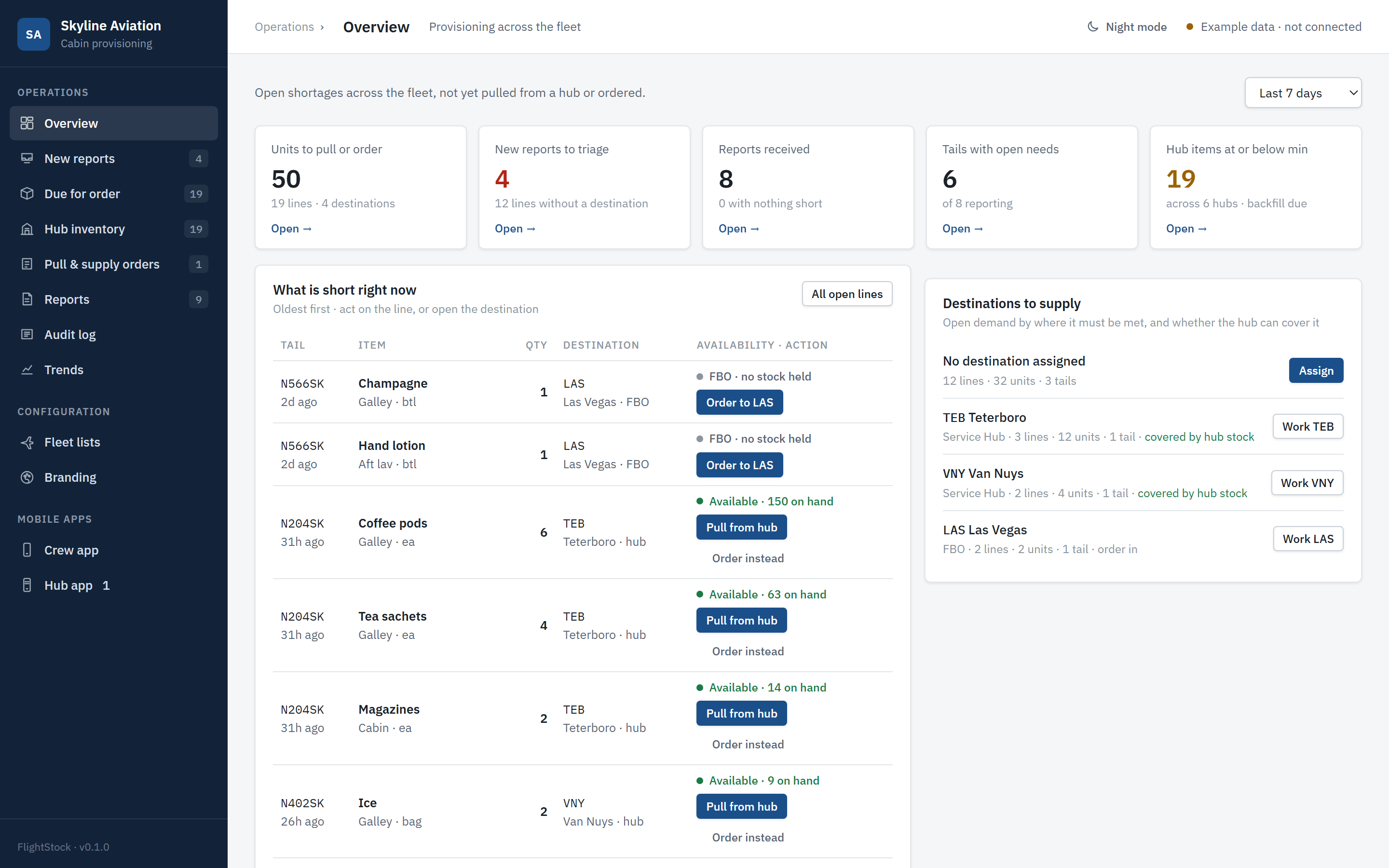
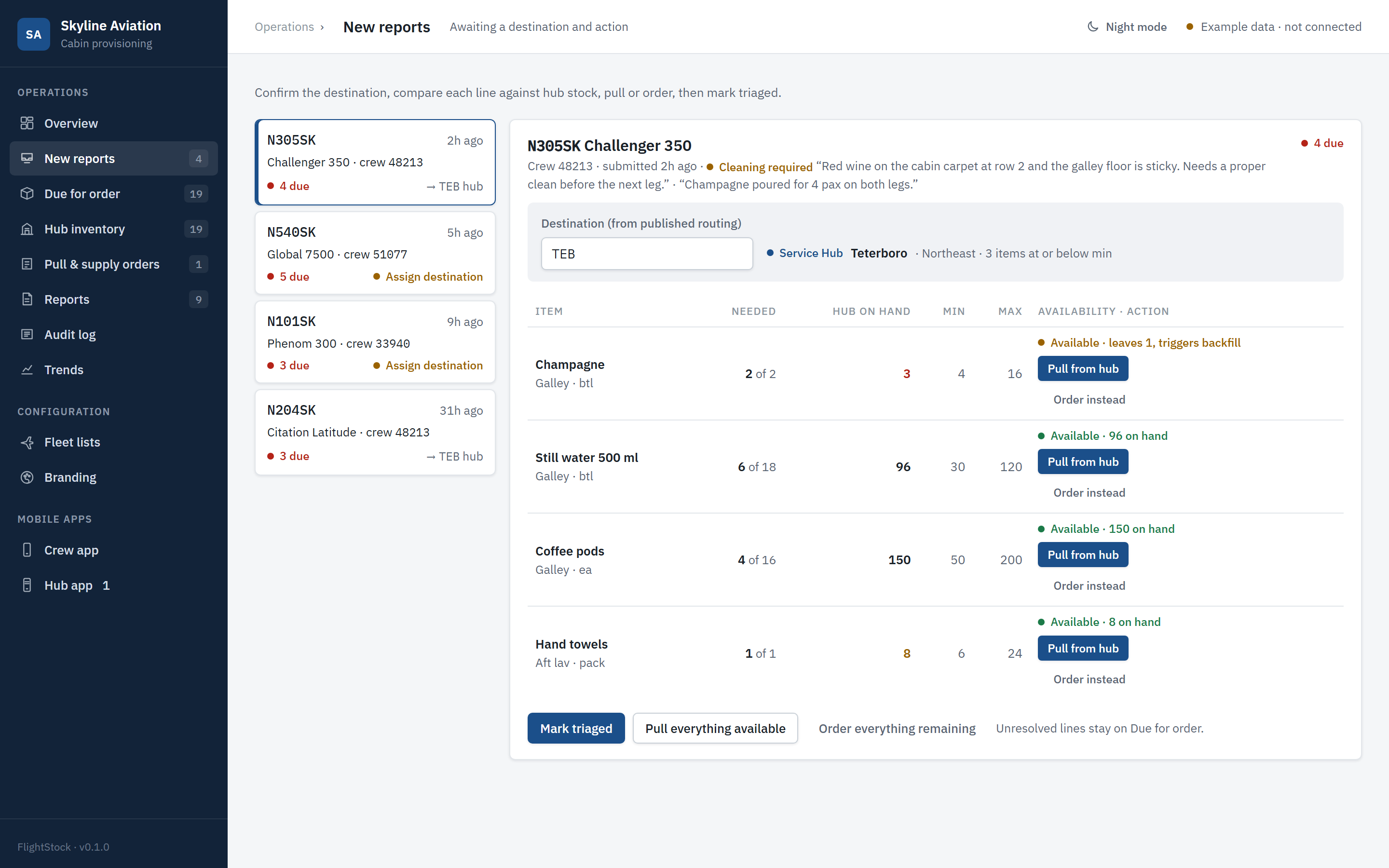
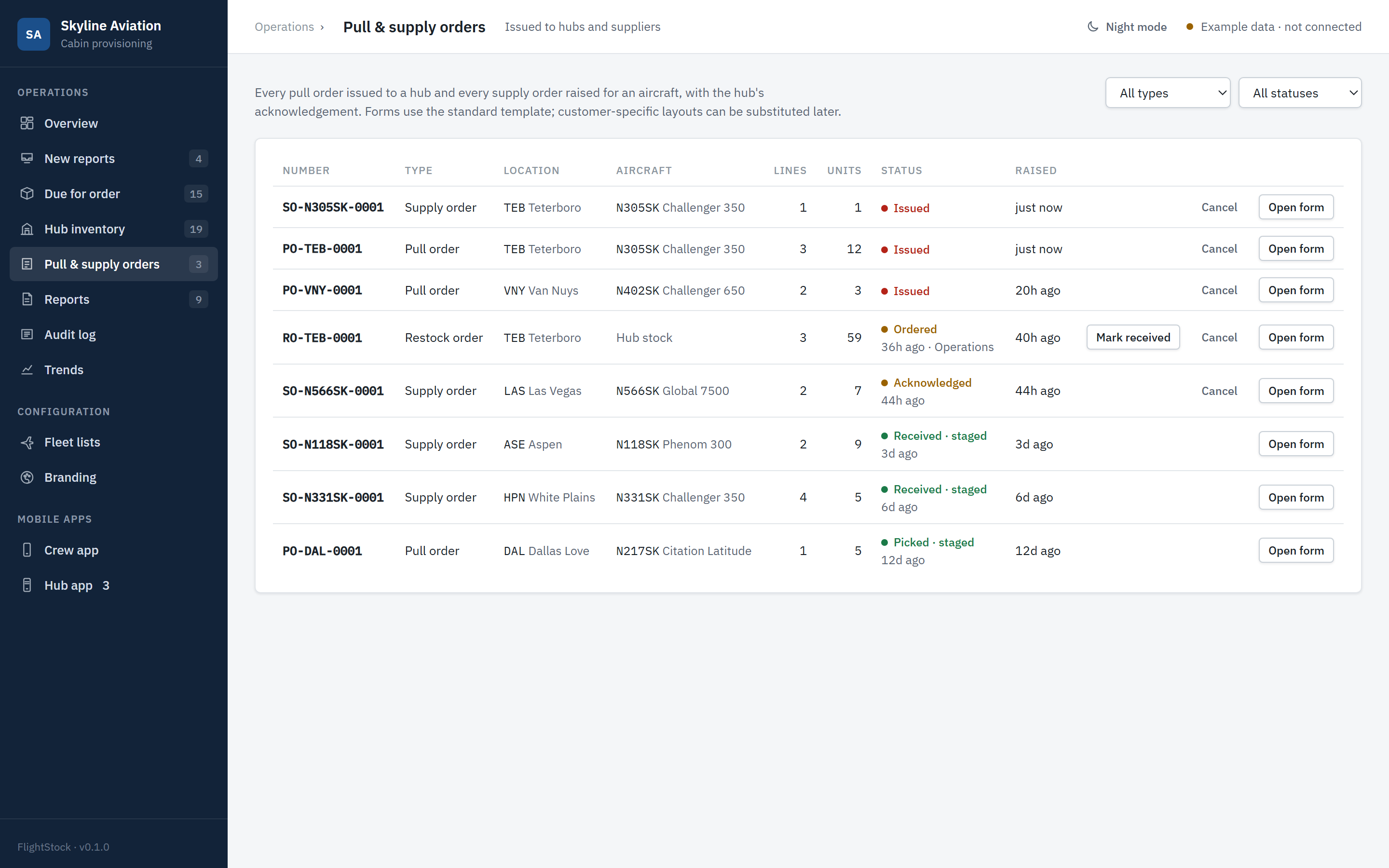
Operations overview: open shortages across the fleet with the action beside each line New report for N305SK with destination TEB assigned and each line read against hub stock Pull and supply orders: PO-TEB-0001 and SO-N305SK-0001 issued
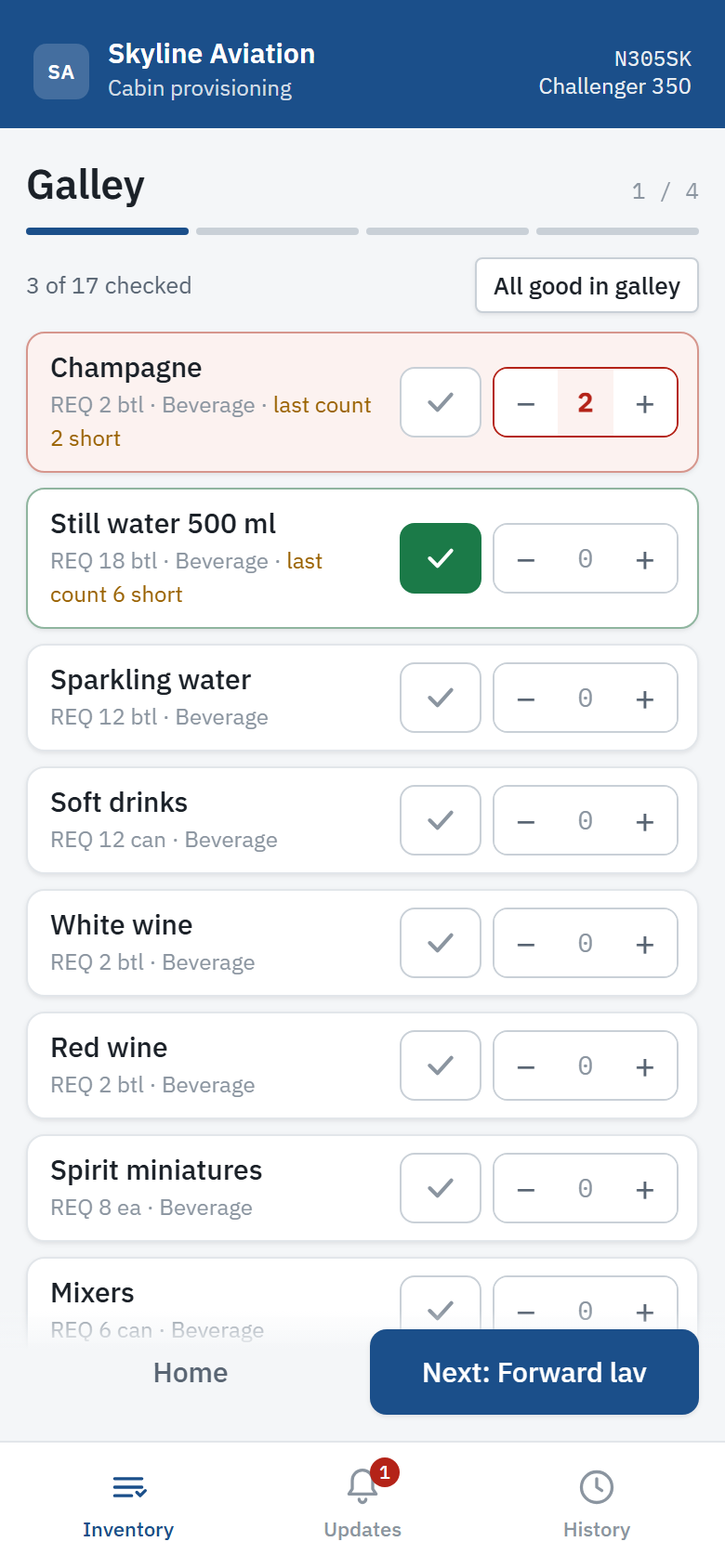
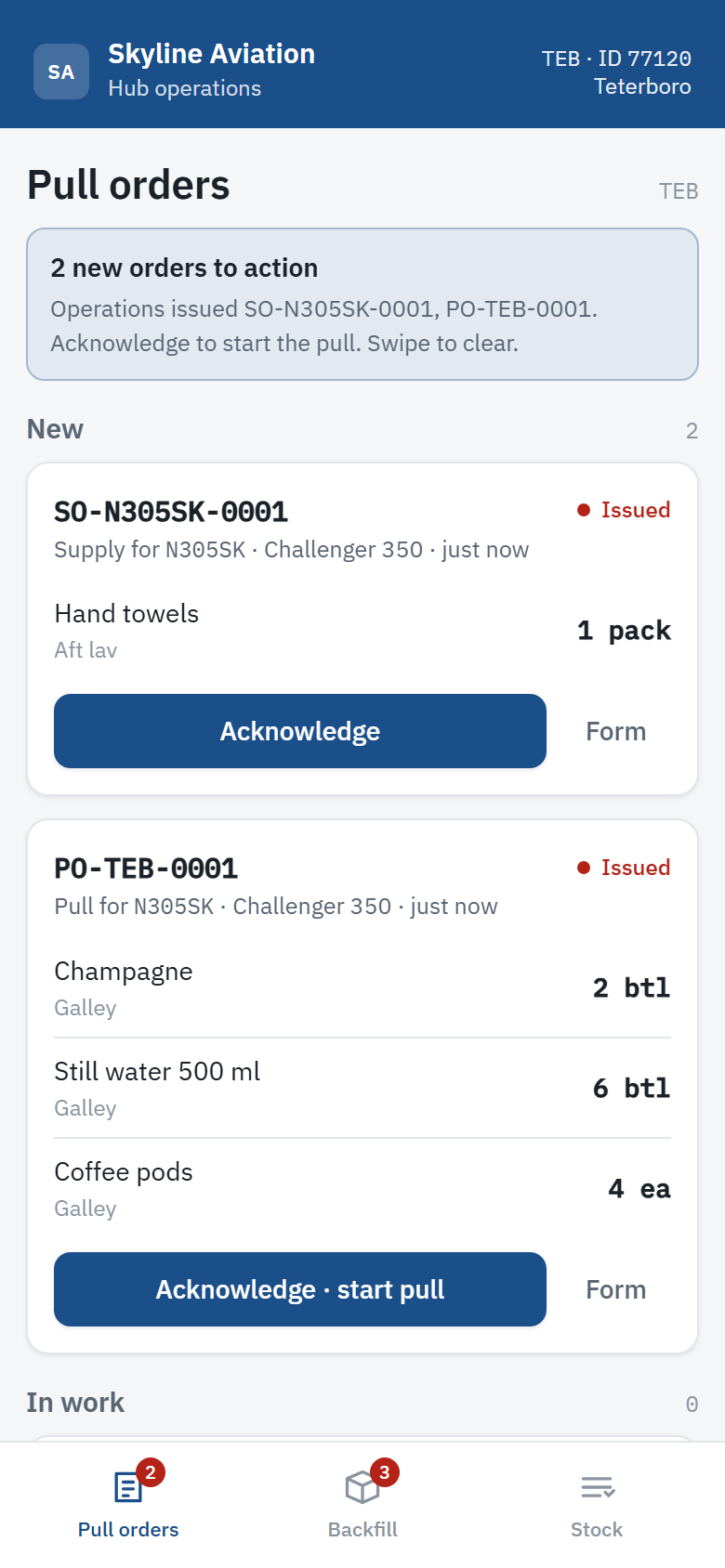
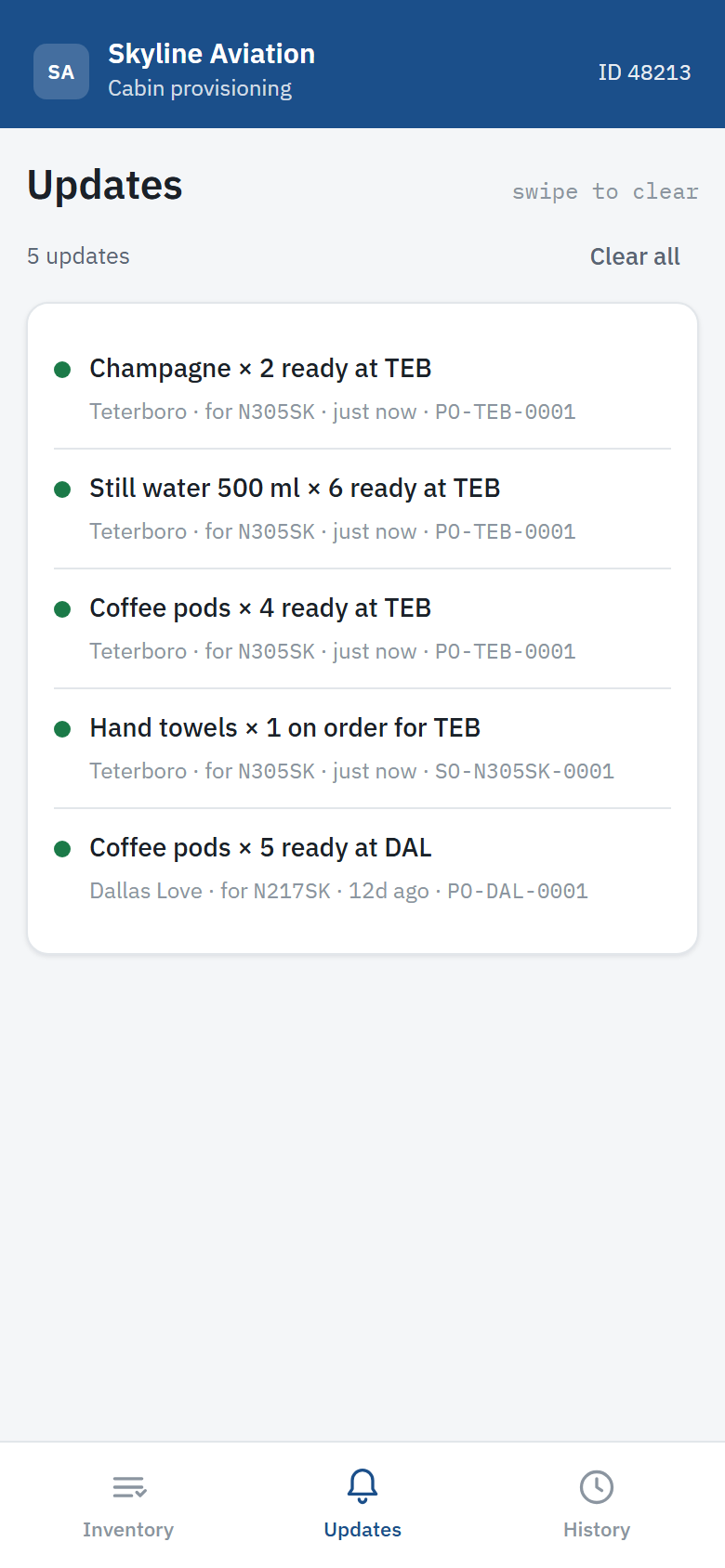
Crew app counting the galley of N305SK: champagne two short Hub app at Teterboro with PO-TEB-0001 waiting to be acknowledged Crew app updates: champagne, still water and coffee pods ready at TEB
01 Crew counts the cabin Open the live demo →
Crew counts the cabinN305SK · galley · champagne 2 short, sent from the aircraft
Wheels stopCrew counts
Report received
Destination assigned
PO-TEB-0142 issued
Picked · staged
Crew notified
Next stopCabin staged
01 · Crew app · iOS and Android

Count it the way you walk it.

Type the tail. The REQ list for that airframe loads in walk order: galley, forward lav, cabin, aft lav. Tap Good or count what is missing. Works in flight and sends on the ground.

  • 01Turnover on every tail. The last inventory anyone filed on that aircraft, with what was short and whether it is staged.
  • 02Offline by design. Counts queue and send on the next connection. A retry cannot create a duplicate.
  • 03Cabin condition. Flag that the aircraft needs cleaning, with comments, on the same report.
  • 04Updates that mean something. Being pulled at TEB, ready at TEB, on order for HPN, with the order number.
02 · Hub app · iOS and Android

The pull order arrives on the floor, with a name on every step.

New, in work, completed. Acknowledge starts the pull and records who. Picked stages it for the aircraft and tells the crew. A stock count raises the restock order on its own.

  • 01One location. A hub manager sees only their own hub's orders, stock and counts.
  • 02Counts, not edits. Submit a count to HQ; anything at or below minimum raises a restock order back to max.
  • 03Received adds to stock. On a ledger, with the order number and the person.
  • 04Cancellations arrive with the reason. Pulled stock returns; the order leaves the queue.
03 · Operations console · web

A queue to work, not a dashboard to admire.

New reports wait for a destination. Each short line is read against that hub's on hand, min and max, with the action beside it: pull, order, or assign. Cancel with a reason and it all unwinds.

  • 01Crews never enter routing. The desk assigns the next stop from the published schedule; every line re-reads against that hub.
  • 02Numbered orders, no duplicates. One pull order per hub per aircraft. Two desks cannot issue the same number or double a pull.
  • 03Forms purchasing can use. Print, download, or export a CSV per order into your own purchasing system.
  • 04Audit log. Every destination, pull, order, cancellation, count and receipt, by whom, exportable.
04 · Platform

Your data, your name, your app store.

Each customer runs on a database that is theirs alone, with the product named and branded the way their crews will recognise it, distributed through private channels.

  • 01A database per customer. Reports, orders, stock and users live in your own project.
  • 02Sign-in with roles. Crew, hub, operations, admin. Every action carries the person's name and ID.
  • 03Transactions, not hope. Order numbers, status changes, pulls and receipts commit atomically.
  • 04Private distribution. Apple Business Manager and Managed Google Play, or your own device management.
  • 05Your inventory structure. Fleet types, sections, items, REQ, tails, locations and stocking levels from your documentation.
  • 06Push notifications. New orders reach the hub device; progress reaches the crew.
The ledger

Every bottle that moved, and who moved it.

Pulls, receipts, counts, corrections and cancellations land on a ledger by hub, with the order number and the person. That is what makes the annual numbers worth ordering against, and what lets a hub prove what it released.

12months of real usage, by item and region
100%of stock movement logged
1CSV per order for purchasing
TEB · Teterboro · todayMovements
Champagne pulled for N305SK
PO-TEB-0142 · Sam Ortiz (77120)
−2 btl
Still water 500 ml pulled for N305SK
PO-TEB-0142 · Sam Ortiz (77120)
−6 btl
Champagne corrected by count
Hub count · Sam Ortiz (77120)
−1 btl
RO-TEB-0009 raised · 3 items at or below minimum
Restock to max · automatic
+59
Champagne received
RO-TEB-0009 · Dana Park (77131)
+13 btl
Mixers received
RO-TEB-0009 · Dana Park (77131)
+37 can
Licensing

Licensed per named user, delivered as your own system.

One developer, one point of contact, no marketplace of add-ons. Pricing is quoted against fleet size, hub count and integration scope.

ComponentWhat it coversBasis
Software licenceOperations console, crew app and hub app, built and branded for you, with your own database and private app distribution. Annual term with support and updates.Per operator · annual
Named usersEvery crew member, hub manager and desk user with a sign-in. Seats are set in your licence and can be raised mid-term.Per named user · annual
IntegrationRouting and scheduling feeds for the next destination, purchasing exports shaped to your system, single sign-on, push notification setup.Scoped · one-time
AdvisoryREQ levels by fleet, hub min and max, walk-order design, and a first annual review from your own usage data.Day rate or retained
Questions

What operators ask first.

Do crews need a connection in flight?
No. The count is saved on the phone after every tap and the report queues in an outbox. It sends on the next connection, and sending twice cannot create a duplicate. Sent reports stay on the phone for 30 days.
Who decides where the stock goes?
Operations does. Crews never enter a destination, because routing can change minutes after they file. The desk types the next stop from the published schedule, and every short line is read against that hub's on hand, min and max before anything is pulled or ordered.
Can two people act on the same order at once?
They can try. Every status change, pull and receipt runs as one transaction against the current state, so the second attempt is refused with a message rather than applied twice. Order numbers come from a counter, so two desks cannot issue the same number.
What does purchasing receive?
A numbered supply or restock order with a printable form and a CSV of the lines: item, section, quantity, unit, on hand, min and max. It is meant to be raised in whatever purchasing system you already run.
Where does our data live?
In a database project that is yours alone, with sign-in roles enforced on the server. The apps are built with your name, logo and colours, and distributed privately through Apple Business Manager and Managed Google Play or your own device management.
How is our inventory structure loaded?
From your documentation: fleet types, sections in walk order, items with REQ per fleet, tail numbers, locations, and hub stocking levels, supplied as spreadsheets. Nothing from the demonstration is included in a customer build.
Next step

See it run on your fleet types, not ours.

A forty-minute walkthrough on the live demonstration, then a pilot build from your inventory documentation. Or open the demo now; it needs no sign-in.

Opens a pre-filled message in your mail client. No form data is stored by this site.